
Advanced Settings
Fine-tune your agent's behavior with Response Creativity and Content Safety controls.
Accessing Advanced Settings
Advanced Settings are available in the Config tab when editing your agent. To access them:
- Navigate to your agent's page
- Click "Edit Details" to enter edit mode
- Switch to the "Config" tab
- Expand the "Advanced Settings" accordion section
Response Creativity (Temperature)
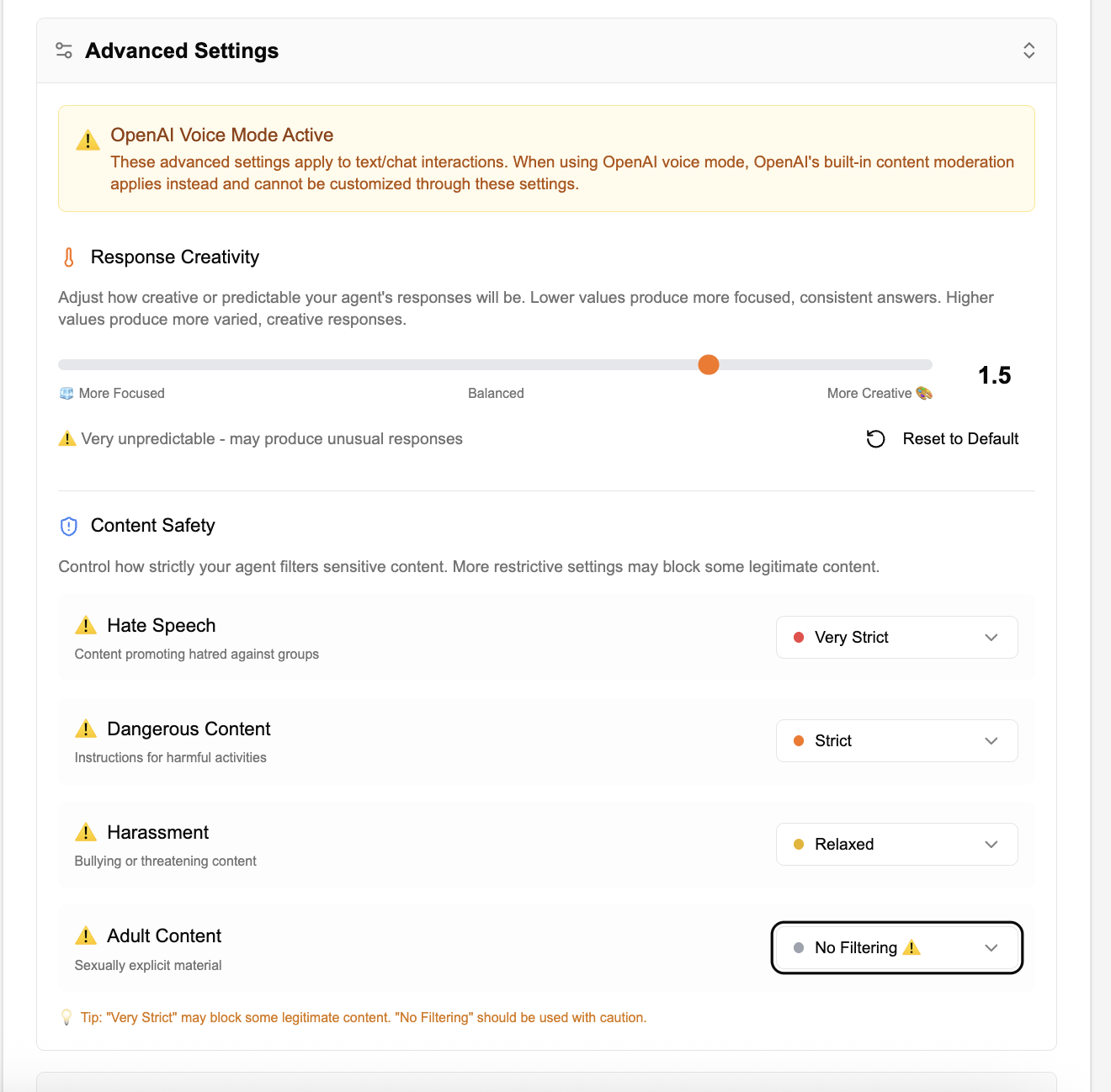
The Response Creativity setting controls how creative or predictable your agent's responses will be. This is commonly known as "temperature" in AI models.
Lower values produce more focused, consistent, and predictable answers. Best for factual queries, data retrieval, and situations where accuracy is critical.
Middle values offer a balance between consistency and creativity. Suitable for general-purpose agents that need some flexibility in responses.
Higher values produce more varied and creative responses. Best for brainstorming, creative writing, or exploratory conversations. May produce unusual responses.
Recommended Settings by Use Case
| Use Case | Recommended Value | Reason |
|---|---|---|
| Customer Support | 0.3 - 0.5 | Consistent, accurate responses |
| Data Analysis | 0.2 - 0.4 | Factual accuracy is critical |
| General Assistant | 0.7 - 1.0 | Balance of helpfulness and variety |
| Creative Writing | 1.2 - 1.5 | More creative and diverse outputs |
| Brainstorming | 1.3 - 1.8 | Maximum variety for idea generation |
Content Safety Filters
Content Safety settings allow you to control how strictly your agent filters sensitive content. Agent5ive provides four categories of content filtering, each with customizable levels.
Safety Categories
Filters content promoting hatred against groups based on race, religion, gender, sexual orientation, ethnicity, or other protected characteristics.
Filters instructions or information for harmful activities, including weapons, illegal substances, or dangerous procedures.
Filters bullying, threatening, or intimidating content directed at individuals or groups.
Filters sexually explicit material and adult-only content.
Filter Levels
Each category can be set to one of four filtering levels:
| Level | Indicator | Description |
|---|---|---|
| Very Strict | Red | Maximum filtering - may block some legitimate content |
| Strict | Orange | Strong filtering - balanced approach for most use cases |
| Relaxed | Yellow | Moderate filtering - allows more content through |
| No Filtering | Gray | No filtering - use with caution, displays warning icon |
- "Very Strict" may block some legitimate content that could be misinterpreted
- "No Filtering" should be used with caution and is marked with a warning icon
- Consider your audience and use case when adjusting these settings
- These settings only apply to Gemini-powered agents, not OpenAI BYOK
OpenAI Voice Mode Behavior
When using OpenAI Voice Mode (available with BYOK), the Advanced Settings panel will display an informational alert:
This means:
- Response Creativity (temperature) settings will not affect OpenAI voice responses
- Content Safety filters will not apply to OpenAI voice interactions
- OpenAI uses its own moderation system that operates independently
- For text interactions with OpenAI models, their built-in safety measures still apply
Best Practices
- Use lower creativity values (0.3-0.7) for consistent responses
- Set all safety filters to "Strict" or "Very Strict"
- Regularly test your agent to ensure appropriate behavior
- Document your settings choices for compliance purposes
- Experiment with higher creativity values for variety
- Adjust safety filters based on your content needs
- Test extensively after changing settings
- Consider your audience when relaxing filters