
Security Guide
Understand deployment types and protect your AI agents
Private vs Public Deployments
When you deploy an agent on Agent5ive, you choose between two fundamental access modes. This decision affects who can interact with your agent and how it can be accessed.
Private deployments are only accessible to authenticated users within your account. This is the default and most secure option.
Who Can Access:
- You (the agent creator)
- No one else - not even with the agent link
Best For:
- Internal business tools
- Agents handling sensitive data
- Development and testing
- Personal productivity agents
Public deployments allow anyone with the link to chat with your agent. Great for sharing, but requires careful consideration of security settings.
Who Can Access:
- Anyone with the direct link
- Anyone on websites where you embed the agent
- Search engines (if linked publicly)
Best For:
- Customer support agents on websites
- Public-facing chatbots
- Demos and showcases
- Community tools
What Does Public Deployment Mean?
When you enable public access for an agent, several things happen:
Shareable Link
Your agent gets a unique URL that anyone can visit to start chatting immediately without logging in.
Embed Code
You can embed the agent on any website using an iframe or JavaScript widget. See the Embedding Guide.
Usage Costs
All interactions count toward your message quota, regardless of who initiates them.
- Anyone can consume your message quota if unprotected
- Connected tools may be triggered by external users
- Chat histories from public users are stored in your analytics
How to Protect Public Agents
Agent5ive provides multiple protection layers for public deployments. You can use these individually or combine them for maximum security.
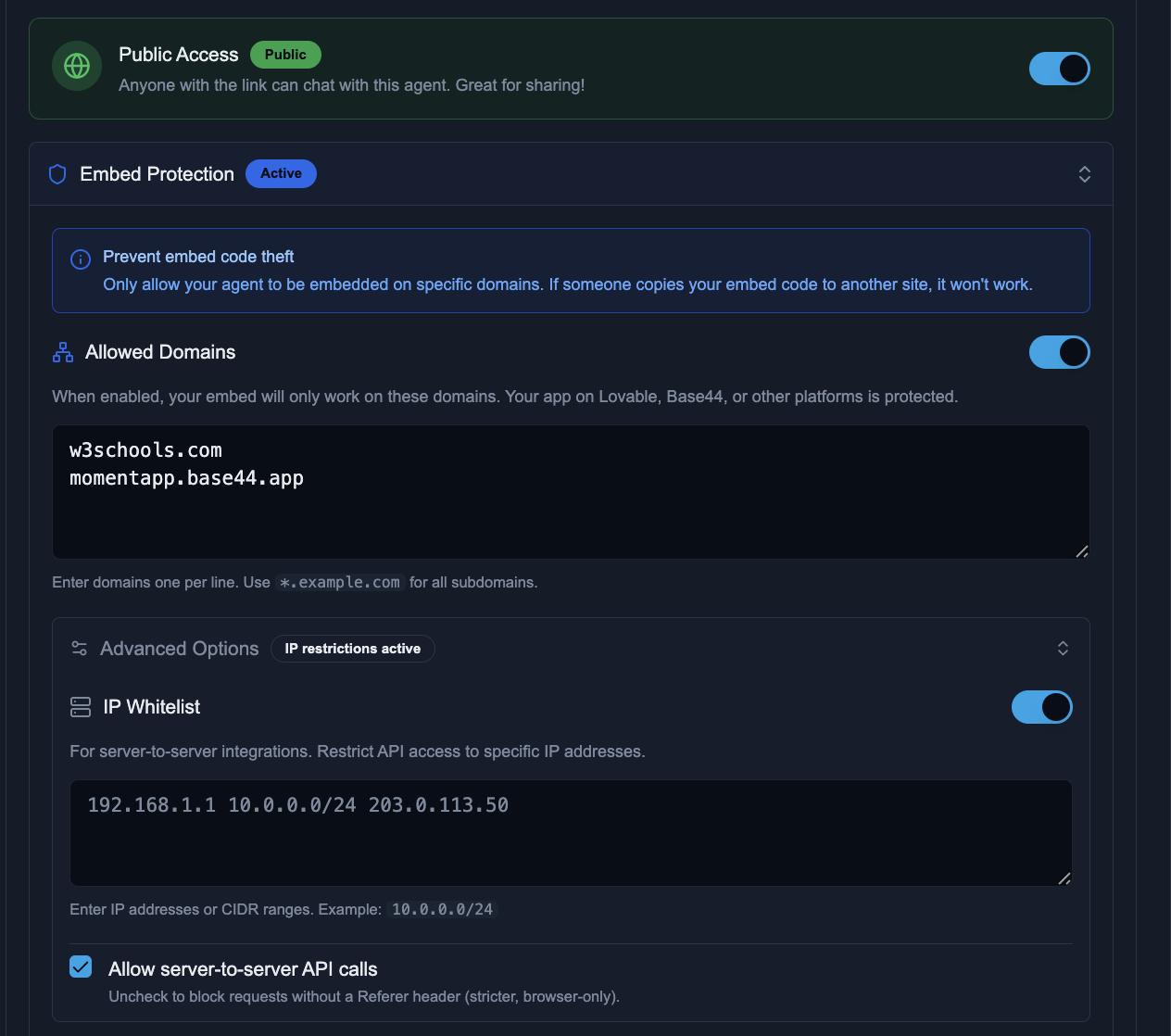
1. Embed Protection (Domain Allowlist)
Restrict which websites can embed your agent. If someone copies your embed code to an unauthorized site, it simply won't work.
- Enable Embed Protection in your agent's deployment settings
- Add your allowed domains (one per line)
- Use wildcards for subdomains:
*.yourdomain.com - Save your configuration
# Example domain configuration
yourdomain.com
www.yourdomain.com
app.yourdomain.com
*.staging.yourdomain.com
2. IP Whitelist
For server-to-server integrations, restrict API access to specific IP addresses or ranges.
- Individual IPs:
192.168.1.1 - CIDR Ranges:
10.0.0.0/24(covers 10.0.0.0 - 10.0.0.255) - Multiple Entries: Separate with spaces or newlines
3. Server-to-Server API Control
Control whether requests without a Referer header are allowed:
Enabled (Default)
Allows API calls from servers, scripts, and tools that don't send Referer headers. Required for most integrations.
Disabled (Strict Mode)
Only allows requests from web browsers on allowed domains. Blocks all programmatic access including legitimate server integrations.
Security Recommendations
By Use Case
- Enable Public Access
- Enable Embed Protection
- Add your domain(s) to allowlist
- Disable server-to-server calls
- Keep Private deployment
- Invite team members explicitly
- Use role-based permissions
- Review analytics regularly
- Enable Public Access
- Enable IP Whitelist
- Add your server IPs/ranges
- Keep server-to-server enabled
Security Best Practices
Principle of Least Privilege
Only enable public access when necessary. Start with private and upgrade to public only when you have a specific need.
Layer Your Protections
Combine domain allowlisting with IP whitelisting for maximum security. Defense in depth protects against different attack vectors.
Monitor Your Analytics
Regularly review your agent analytics for unusual activity patterns, unexpected spikes in usage, or suspicious interactions.
Be Careful with Tools
Public agents with powerful tools (email, calendar, file access) require extra caution. Consider using tool approval policies to require confirmation for sensitive actions.
Review System Prompts
For public agents, ensure your system prompt doesn't contain sensitive information, API keys, or instructions that could be exploited through prompt injection.
Security FAQ
Can someone steal my agent's system prompt?
While your system prompt is not directly exposed, clever prompt injection attempts might try to extract it. For public agents, avoid putting sensitive information in your system prompt and consider adding instructions to refuse requests that ask the agent to reveal its instructions.
What happens if someone abuses my public agent?
Agent5ive includes built-in rate limiting to prevent abuse. However, excessive usage will consume your message quota. Enable embed protection and IP whitelisting to limit who can access your agent. You can also switch to private deployment at any time to immediately cut off public access.
Are chat histories from public users visible to me?
Yes, all interactions with your agent are logged and visible in your analytics dashboard. This helps you monitor usage, identify issues, and improve your agent. Be mindful of privacy regulations if users might share personal information.
Can I switch between private and public?
Yes, you can toggle between private and public deployment at any time from your agent's settings. Changes take effect immediately. Switching to private will immediately block all public access, while switching to public will instantly make your agent accessible via its link.